Memorize It

What it can do

Sign in

A quiet list for the small things of a day and the dates close to the heart. You type (or say) a line the way you would say it to a person; the app works out the day, the time, the repeat and what kind of thing it is. Tap any example below to try it in your own list.

  1. 1

    Type it

    “Pay the electrician by 5pm”, “Amma's birthday 14 feb 1965”, “Gym every mon 6pm”.

  2. 2

    See your day

    Today shows what is due, what is overdue, what is coming up, and what is done.

  3. 3

    Ask it

    “When is my next electricity bill?”, “How old is my son?”, “Bills next month”.

  • Add in plain words
  • Speak it
  • Your day
  • Dates close to the heart
  • Bills and renewals
  • Calendar
  • Ask
  • Keep it right
  • All and streaks
  • Share with one person
  • On your phone

Add in plain words

One line in the box at the top of Today. As you type, small chips show how it was read, so a misread word is caught before you press Enter.

The day

You typeIt reads as
  • Call Amma tomorrowtomorrow (also tmrw, tmr, day after tomorrow)
  • Dentist 22 oct22 October (also oct 22, 22-10, 22/10/2026, wed 14 oct)
  • Pay rent on the 1stthe next 1st of a month
  • Gym satthis Saturday (also next sat, sat week, this weekend)
  • Service the car in 2 weeksin 2 weeks (also in 3 days, in a fortnight, next month)
  • Clear the loft end of monththe last day of this month (also eom, mid oct, early nov)

No day means today. A day that has passed this year rolls to next year.

The time

You typeIt reads as
  • Walk at 6pm6 pm (also 6pm, @6, 18:00, 6.30pm, half past 6, quarter to 7)
  • Call the bank at 1111 am; a bare 1 to 6 reads as the afternoon
  • Lunch with Ravi at noon12 pm (midnight works too)
  • Walk in the evening6 pm; morning is 9 am, afternoon 3 pm, night 9 pm

Without a time, a chore sorts as if due at 5 pm. Past its time today, it turns red.

Repeats

You typeIt reads as
  • Water the plants every daydaily (also daily, every morning at 7)
  • Gym every mon wed frithose weekdays (also every weekday, every weekend, on mondays)
  • Weekly reviewonce a week on today's weekday
  • Laundry every other weekevery 2 weeks (also fortnightly, every 3 weeks)
  • Rent on the 1st of every monthmonthly on that day (also monthly, every month starting 1 nov)
  • LIC premium quarterly from 12 octevery 3 months from that day (also half-yearly, every 2 months)
  • Pongal every 14 janevery year on that date (also yearly, annually)

Extras

You typeIt reads as
  • Call the plumber tomorrow !important: a star, and first in its day (also “important”, “urgent”)
  • Fix the shed door somedayno date; lives on the All page (also no date, whenever)
  • Passport renewal 20 nov remind 30 days beforean early reminder (also a week ahead, 3 days early)
  • remind me to buy milk tonightthe “remind me to” is dropped; the rest is read as usual

Mixed order is fine: “at 3pm on 22 oct call the bank” and “call the bank 22 oct 3pm” read the same. Dates are day first, Indian style: 2/3 is 2 March.

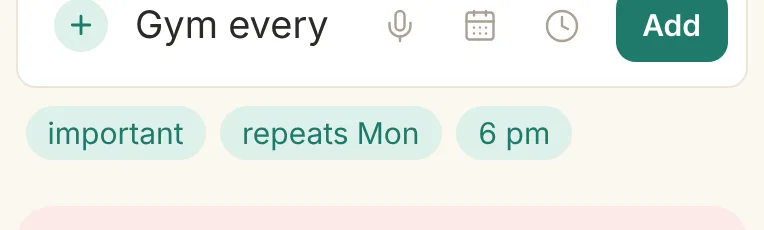
The add box with “Gym every mon 6pm !” typed and three chips below it: important, repeats Mon, 6 pm
The chips show the reading: important, repeats on Mondays, at 6 pm.
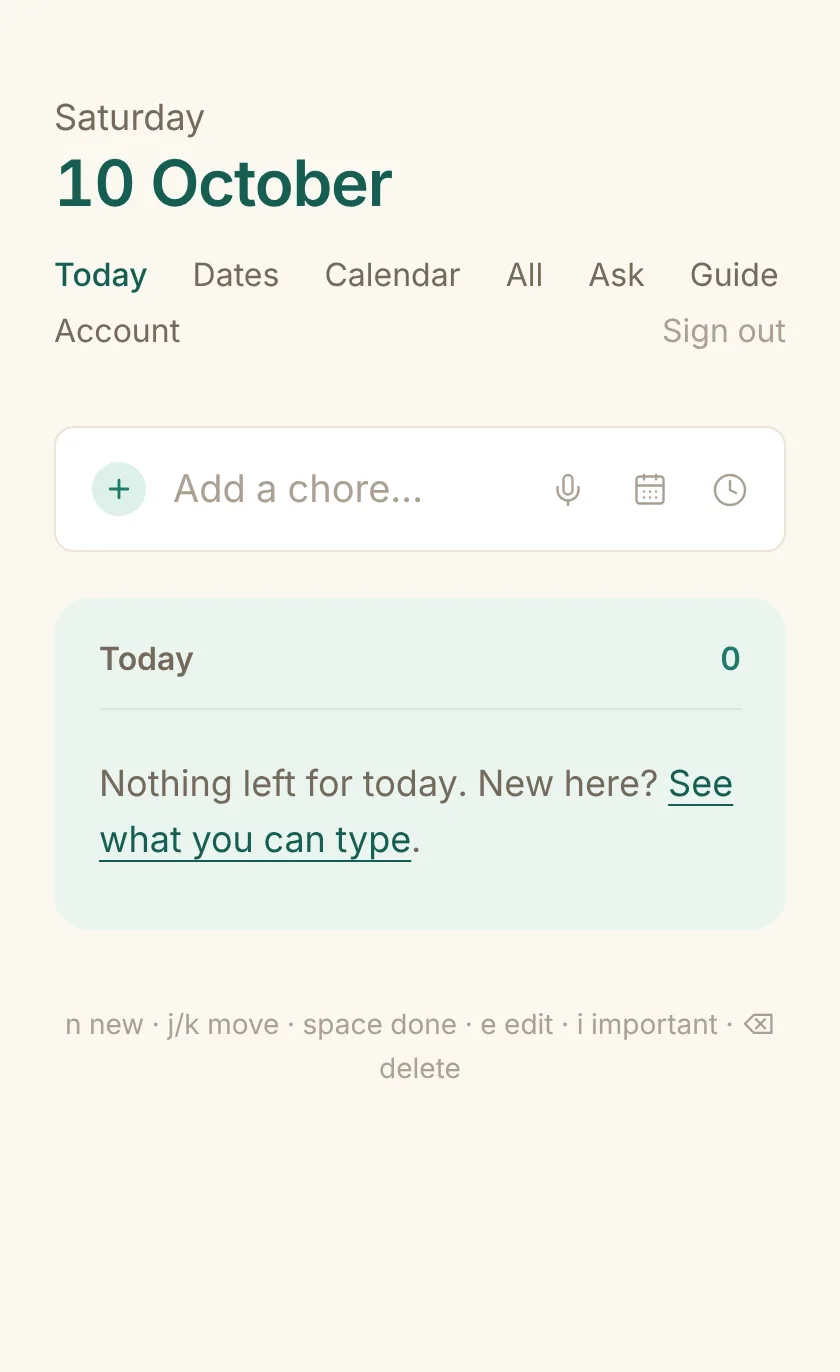
Today with nothing on it: the add box, a Today panel reading “Nothing left for today”, and the keyboard hints
Where it all starts. The calendar and clock buttons pick a day or time if you would rather not type one.

Speak it

The microphone in the add box listens through the browser's own speech recognition. Say the line the same way you would type it.

  • Tap the microphone, speak, pause. The words land in the box with the usual chips.
  • Check the chips, then tap Add. A misheard word is fixed in the box before anything is saved.
  • A spoken question (“when is my next electricity bill?”) is not added: it goes to Ask and the answer is read back aloud.
  • Needs a browser with speech recognition (Chrome, Edge, Safari) and microphone permission. Nothing is sent to this server; the browser does the hearing.
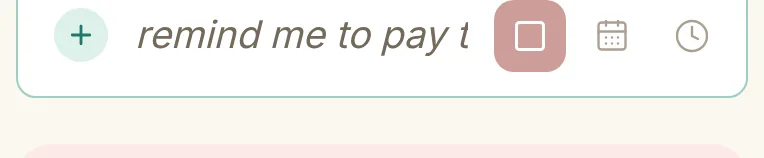
The add box while listening: the words heard so far in italics and a red stop button
Words appear as they are heard; it stops by itself after a pause, or tap the square.

Your day

Today is one column, in the order you would look at it. Tick the circle when something is done; tap again within a moment to untick.

Overdue
Anything whose day has passed. In red until it is done or moved.
Today
Due today. Starred items first, then by time.
Coming up
Bills, birthdays, renewals and events inside their reminder window, with how far away they are.
Later
Plain chores scheduled for another day.
Done today
Folded away. Open it to undo or delete.

A repeating chore ticked today comes back on its next day. Delete or undo from the small bar that appears after a tick or a delete.

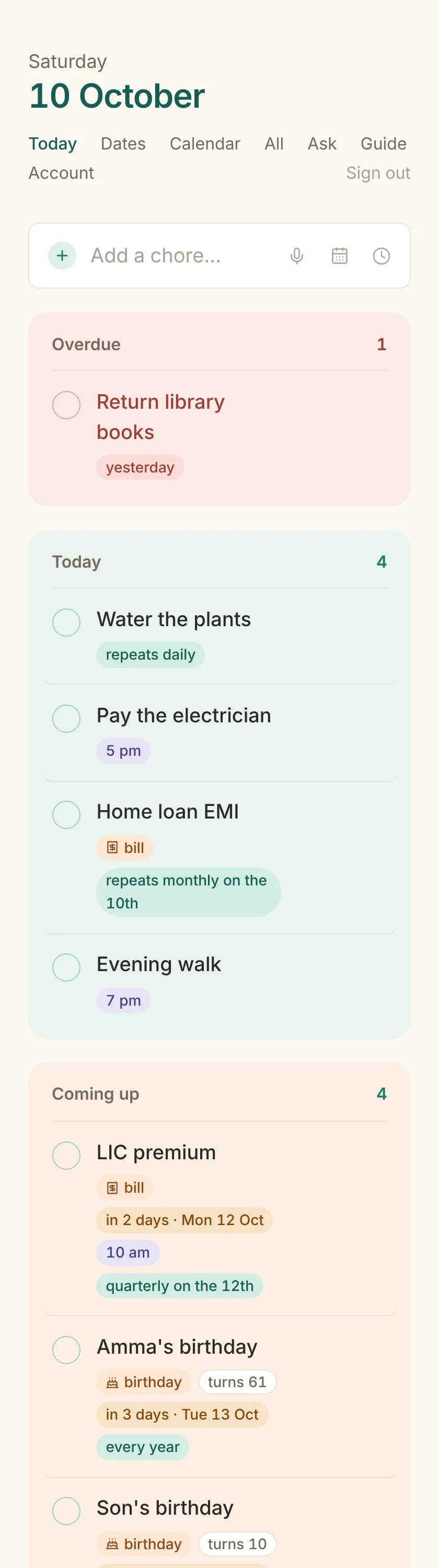
The Today page with Overdue, Today, Coming up, Later and Done today panels
Five panels, each its own soft colour. Empty ones stay out of the way.

Dates close to the heart

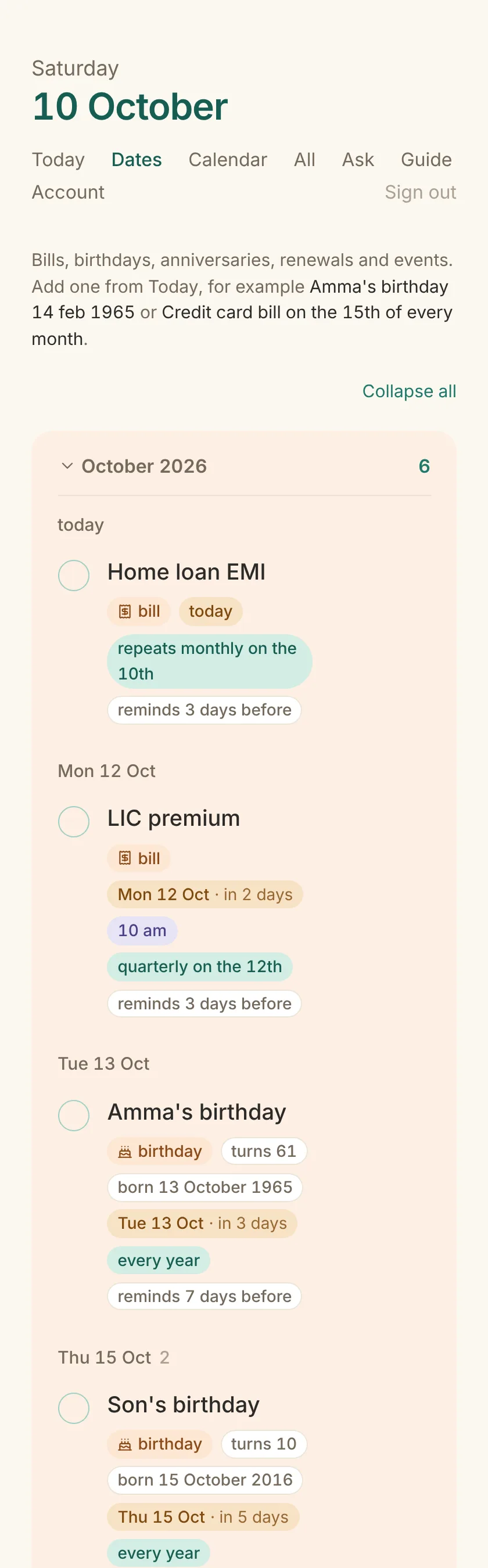
Birthdays, anniversaries, renewals and events are entries like any other, with a type, a yearly repeat and an early reminder. The words you use set the type.

You typeType and reminder
  • Amma's birthday 14 feb 1965birthday, every year, 7 days early; the year gives her age
  • Wedding anniversary 22 nov 2010anniversary, every year, 7 days early (also married, housewarming)
  • Car insurance renewal 30 octrenewal, 30 days early (also expires, subscription, licence, passport, visa, domain)
  • Diwali 8 novevent, 3 days early (also pongal, christmas, puja, exam, appointment)
  • Credit card bill on the 15th of every monthbill, 3 days early (also premium, EMI, rent, fees, tax, broadband, recharge)

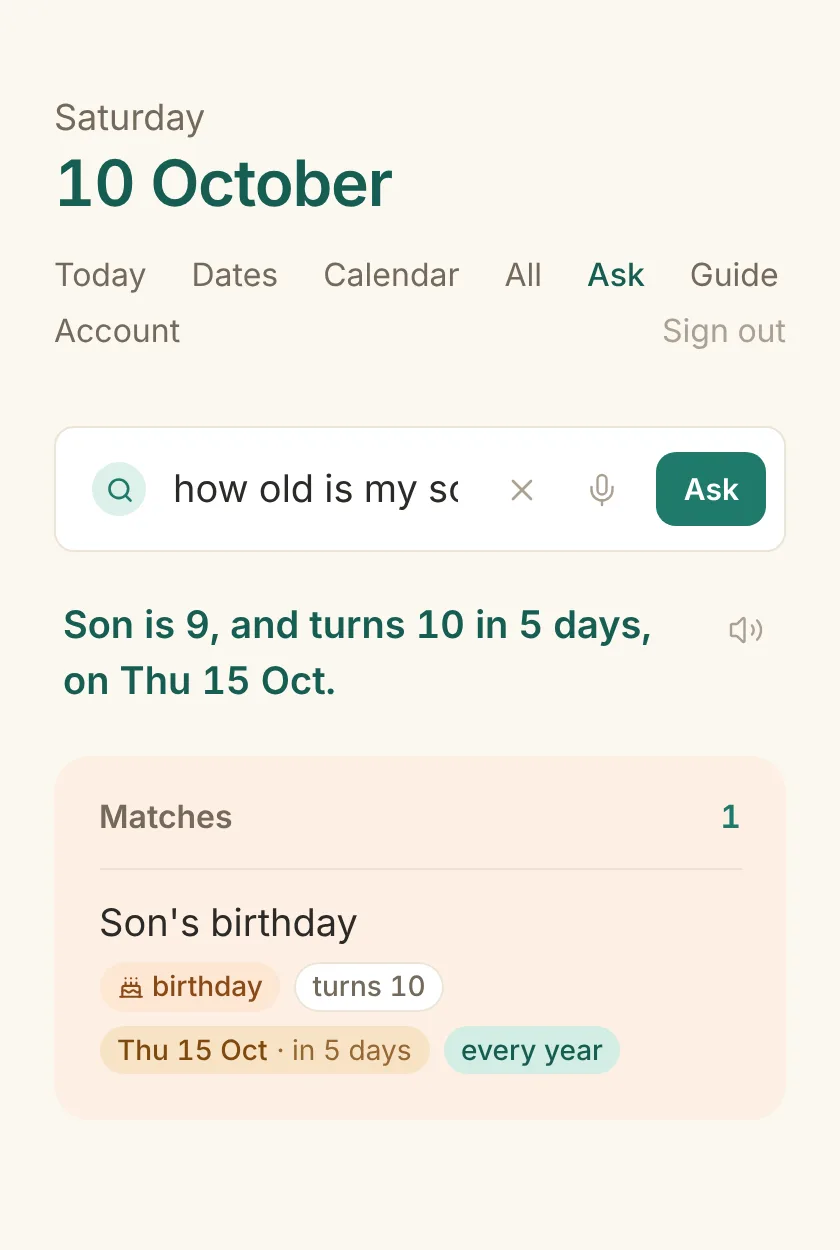
Ages: “Son turns 10”

Give a birthday its year and the app says who turns what: on Today, on the Dates page and in Ask. Any of these work:

Son's birthday 12 oct 2016Ravi bday 12 oct born in 2016Appa born 2 jan 1956Dad turns 70 on 2 janMarried on 5 may 2010
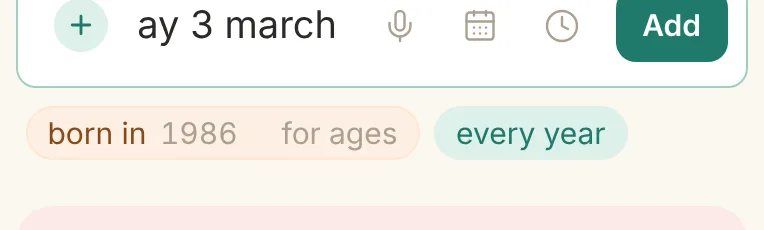
The add box after typing “my wife's birthday 3 march”, with a “born in ____ for ages” chip
No year? A small chip asks for it.
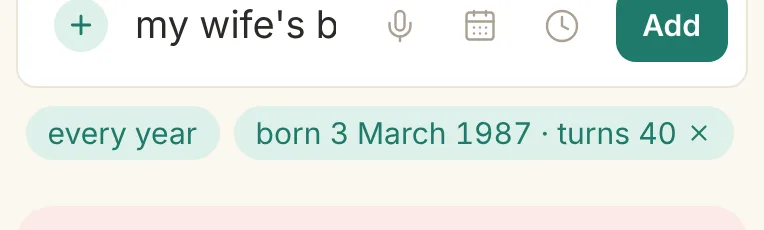
The same box after typing 1987 into the chip: it now reads “born 3 March 1987 · turns 40”
Type it and the age appears.

Forgot the year? The Dates page shows “born in ____” on the row until you fill it, and the pencil on any row opens a form with a Born in field.

The Dates page with months expanded, showing birthdays, bills and renewals with their chips
The Dates page, month by month. Each month folds to a line; tap it to open.

Bills and renewals

Monthly, quarterly, half-yearly, every so many months: say it once and the next due date keeps moving on its own. Ticking a bill marks that month's payment.

You typeIt reads as
  • Electricity bill on the 5th of every monthmonthly on the 5th
  • Home loan EMI on the 10th of every monthmonthly on the 10th, a bill
  • LIC premium quarterly from 12 octevery 3 months, counted from 12 October
  • Term insurance half-yearly from 3 novevery 6 months (also semi-annual, twice a year)
  • Water bill every 2 months starting 1 novevery second month from 1 November
  • Broadband renewal 28 oct remind 5 days beforea renewal with its own reminder window

The All page keeps the history: how many times each repeating entry was ticked, and the current streak. Ask can count them too: “how many EMI payments have I paid this year?”

Calendar

A month at a glance, with a small count on every day that has something, and the day's list underneath.

  • Tap a day to see its entries; use the arrows to move month by month.
  • The chips above the grid hide a type for a while: chores, bills, birthdays, renewals. Handy to see only the money, or only the people.
  • Repeating entries are projected forward, so December already shows December's bills.
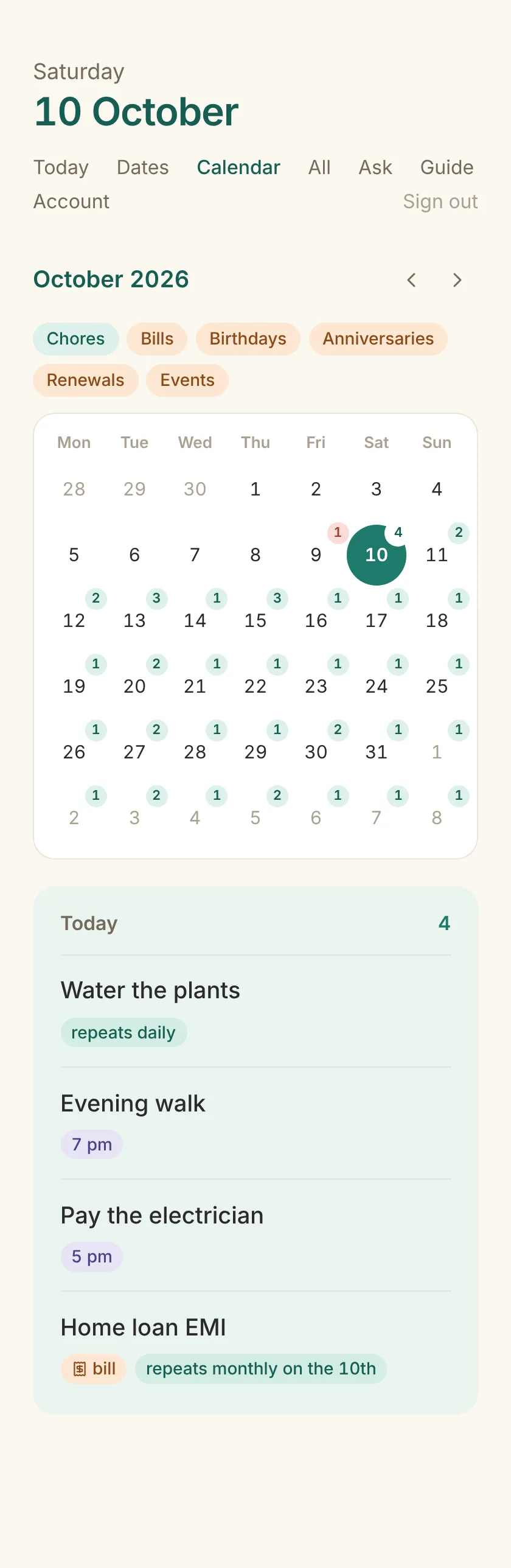
The calendar page: a month grid with pale count badges, today in teal, and the selected day's entries listed below
Pale badges keep the month calm; only the selected day is strong teal.

Ask

Plain questions, typed or spoken, answered from your own entries. The answer is one line with how far away it is, above the matching rows. Nothing leaves your server; there is no AI service behind it.

Try asking

When is my next electricity bill?When is my electricity bill next month?How many EMI payments are pending this year?Which bills have I paid this month?Bills in the next 30 daysBirthdays in NovemberWhen is Amma's birthday?How old is my son?Who turns 40 this year?Do I have anything tomorrow?Renewals by 15 nov

What it understands

  • When gives the next one. How many counts. Anything else lists.
  • A period: today, tomorrow, this or next week, month, year; the next 30 days; in November; by 15 Nov. Repeating bills are counted once per occurrence inside it.
  • Past tense looks back: “have I paid”, “already done”, “which chores did I do this month” use your tick history.
  • Type words (bills, birthdays, renewals) and the rest of the words match titles.
  • Spoken from the Today box, a question is answered aloud. The speaker button on an answer reads it again.
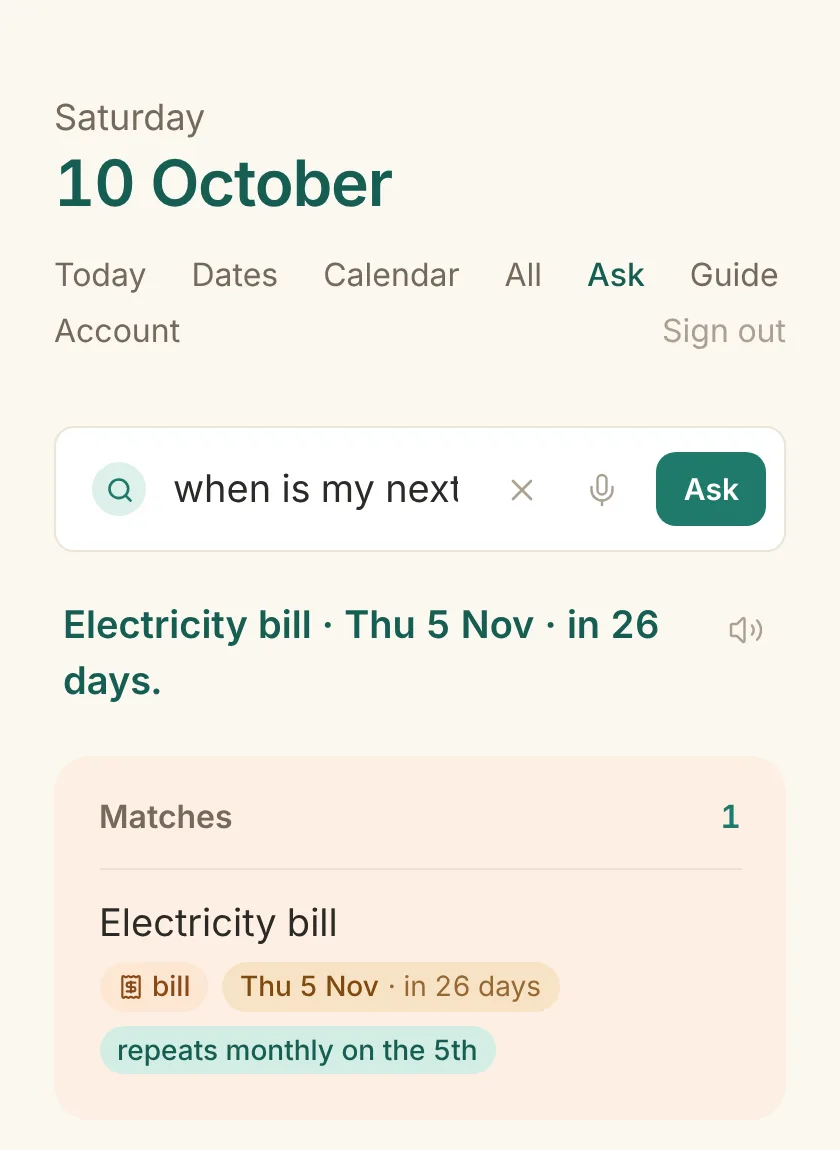
The Ask page answering “when is my next electricity bill?”: Electricity bill · Thu 5 Nov · in 26 days, with the matching row
The Ask page answering “how old is my son?”: Son is 9, and turns 10 in 5 days, on Thu 15 Oct

Keep it right

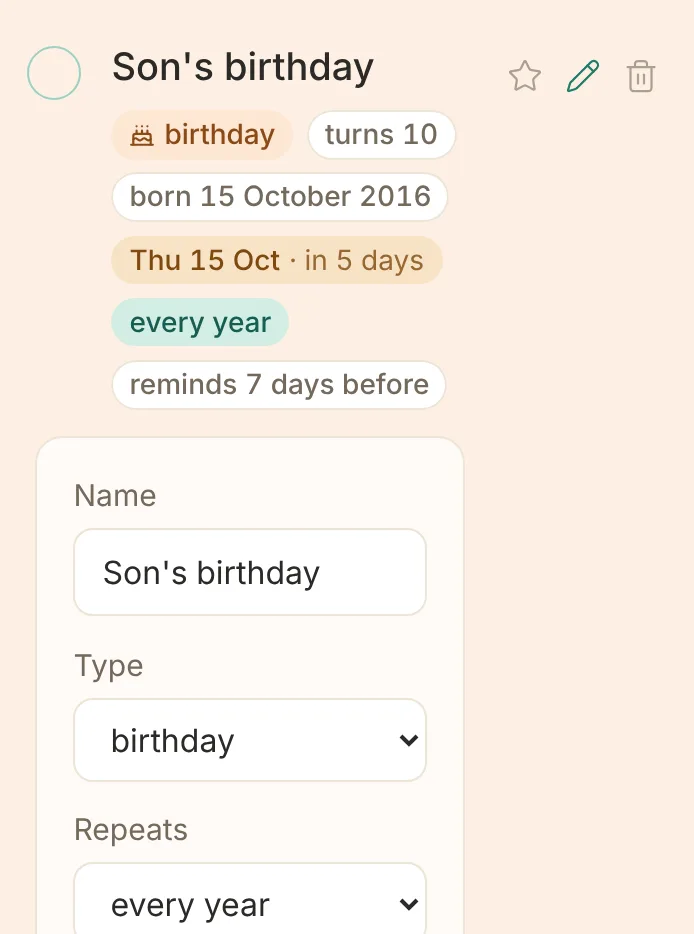
Every row has a star, a pencil and a bin. The pencil opens a form under the row: name, type, day, time, repeat, the year it began, the reminder window.

  • Tap the title to rename in place. The same words work there: “Bins every wed” renames and reschedules in one go.
  • The star moves an item to the top of its day; the bin deletes, with an undo.
  • On a phone the three buttons are always there; on a desktop they appear on hover.

Keyboard, on a desktop

nnew: focus the add box
j / k or ↑ / ↓move between rows
space or xtick the row
e or Enterrename
istar
Backspacedelete (undo appears)
A birthday row with the edit form open beneath it: Name, Type, Repeats, Next on, Time, Born in, Remind days before, and Save and Cancel buttons
Nothing changes until Save. A wrong value is refused with a sentence.

All and streaks

Everything open, in three groups: repeating, one-off, someday. Repeating entries show how often they were ticked and the current run.

  • “3 days in a row” for a daily chore, “4 weeks running” for a weekly one.
  • Someday items wait here until you give them a day with the pencil or by renaming.
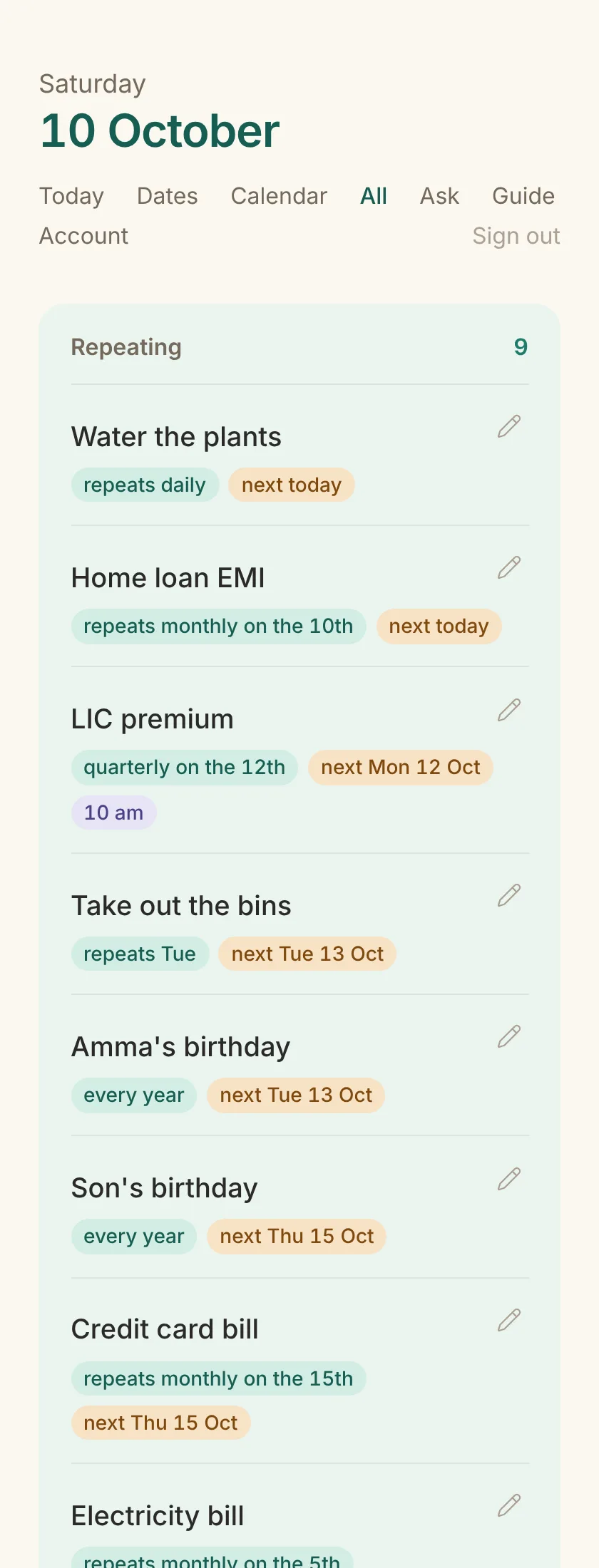
The All page listing repeating chores with streaks, one-off chores and someday items

Share with one person

Two people, one list. Invite the other person from Account; once they accept, you both see the same chores and dates, and either of you can add, change or tick.

  1. They sign up here with their own email and password (or Google).
  2. On your Account page, type their email under Sharing and tap Invite.
  3. They see the invitation at the top of their Today and on their Account page, and accept.
  • Everything either of you adds is on the one list; the pencil, star and bin work for both.
  • A tick by the other person is marked “by their name” under Done today.
  • Coming back to the app refreshes it, so their changes are there when you look.
  • Stop sharing from Account at any time: each of you keeps what you created.
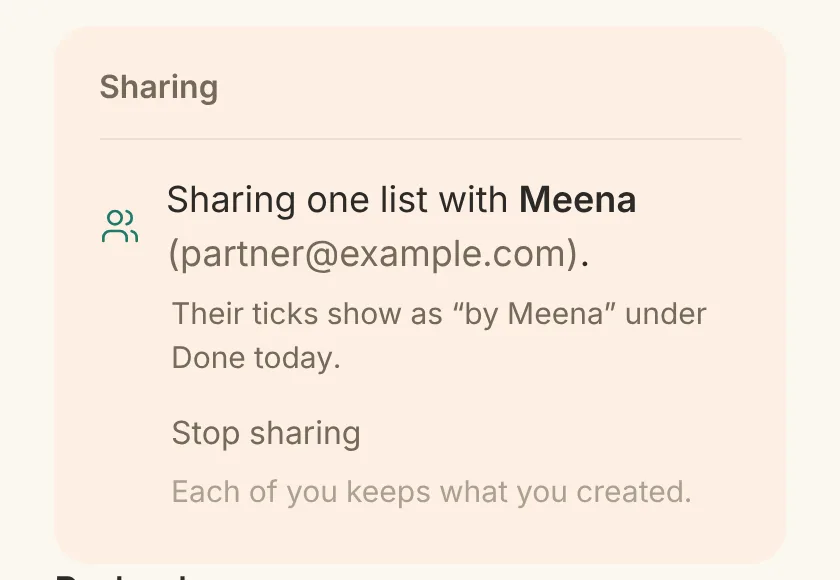
The Account page's Sharing panel: “Sharing one list with Meena”, with a Stop sharing link
Account → Sharing. Their ticks show as “by Meena” under Done today.

On your phone

It is a website that installs like an app: full screen, on the home screen, and the Today list readable even without a connection.

Install

  • Android, Chrome: the ⋮ menu → “Add to Home screen” or “Install app”.
  • iPhone, Safari: the Share button → “Add to Home Screen”.

Signing in

  • Email and password, once per device; you stay signed in for three months.
  • Where Google sign-in is switched on, “Continue with Google” works too. Using the Google account with the same email joins it to your existing account, so either way in reaches the same list.
  • Days follow your phone's time zone, so “today” is your today wherever you are.
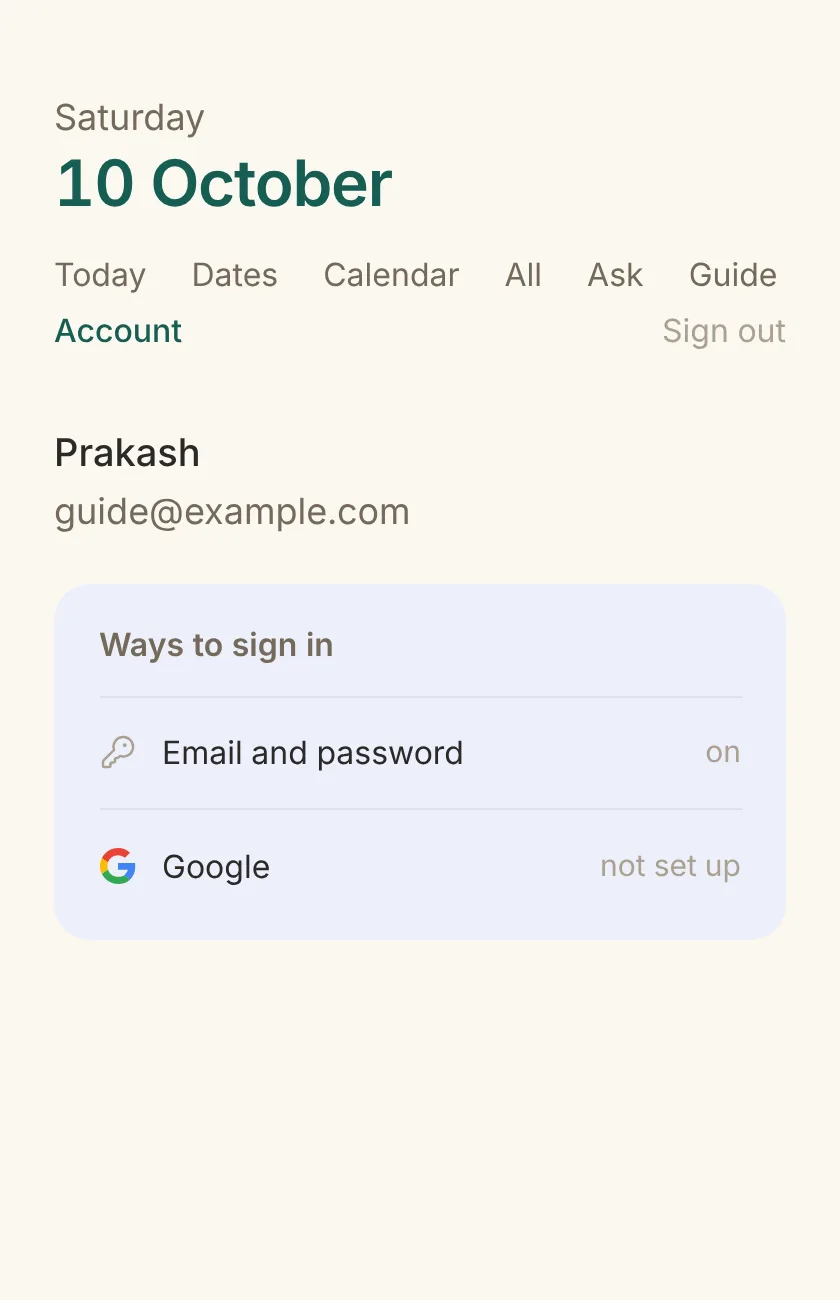
The Account page: name and email, a Ways to sign in panel listing Email and password and Google
Account shows the ways in. Google can be linked or removed here.

Everything here runs on your own server. Voice uses the browser's recogniser; Ask works from your entries alone.